Sometimes Google, Yahoo, and Bing will show additional links for a search result under the description for that result. These are often referred to as Site Links, Sitelinks, or Quick Links by the search engines. An example is the sitelinks that Google shows in a search result for the WordPress site when someone searches at Google for wordpress:
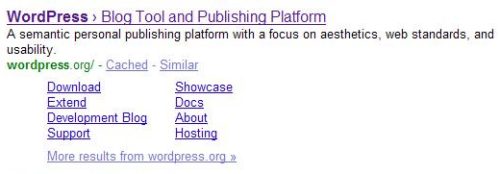
None of the search engines presently allow site owners or webmasters to choose the links that show up as sitelinks or quicklinks in those search results. Google provided some hints as to how sitelinks might be chosen in the description of the patent on Google Sitelinks. Yahoo also gave us some information about the sources of information that they use when they include quicklinks for a search result in a white paper on Yahoo quicklinks. Microsoft also released a whitepaper on how they might include links such as sitelinks to give searchers a chance to find what they call final destination pages.
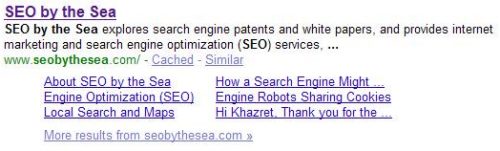
Some of the choices for sitelinks and the text for those links that Google chooses aren’t really helpful for searchers or ideal for webmasters, such as the the site link at the bottom right in an “SEO by the Sea” search result as seen in the next image:
Fortunately, Google allows webmasters to block the use of specific sitelinks using Google Webmaster Tools, with a chance to explain why those sitelinks are blocked. The choices they list when someone is blocking a specific sitelink include:
- The link is broken
- I don’t want this page emphasized
- The title is inaccurate
- Other
I’ve blocked a number of sitelinks, primarily because the title that Google selected for those sitelinks were useless. For example, the link text “Hi Khazret, Thank you for the …” as seen in the image above doesn’t tell potential visitors anything about the page being linked to. I’ve set it to be blocked in Google, and they may remove it within the next week or so, when they get around to it.
Should site owners or webmasters be empowered to choose the links and the text associated with them when sitelinks show up for a site?
Microsoft and Quick Links
Microsoft came out with a patent application recently that describes a number of ways that they might allow people who run websites to indicate which links they might like to be shown as quick links, and what text should associate those links.
The patent inventors explain their thoughts on the benefits of this approach:
Permitting a webmaster to specify such desired link information is beneficial as generally, those building a web site are in a better position than the search engine itself to anticipate a user’s actual intended use of the web pages associated the web site, particularly when the web site is either less popular or otherwise has limited viewer-history associated with it.
Search engines will normally use the title text that a webmaster chooses in the
The patent filing also presents a number of different ways that they might let webmasters tell search engines which links and text for those links that they would like to use. The patent filing is:
Indexing Explicitly-Specified Quick-Link Data for Web Pages Invented by Tabreez Govani and Srinath Aaleti Assigned to Microsoft US Patent Application 20090204579 Published August 13, 2009 Filed February 13, 2008
Abstract
Systems, methods, and computer storage media having computer-executable instructions embodied thereon for permitting webmasters to explicitly specify links or other web pages that the webmaster believes visitors to the web site or web page are interested in viewing are provided.
Systems and methods for identifying explicitly-specified site-link data upon crawling the web site, indexing the site-link data in association with the web site or a web page, and exposing at least a portion of such site-link data when the associated web site and/or web page surfaces as the result of an input search query are also provided.
We’re told that a webmaster might tell a search engine which quick links to use in the following places:
- Meta tags
- robots.txt files
- sitemaps
- HTML A tags,
- other places within the HTML associated with a web page (not shown), and
- other specific files that can be served by the web server (not shown)
Here are some of the potential options
Specifying Quick links by Meta Tags
A webmaster might be able to use a quicklink meta tag to specify quick links and associated title on pages where they wish to offer quick links.
Example:
<meta name=”quicklink” content=”www.examplenews.com/pages/world/index.html World”/> <meta name=”quicklink” content=”www.examplenews.com/pages/opinion/index.html Opinion”/> <meta name=”quicklink” content=”www.examplenews.com/pages/business/index.html Business”/> <meta name=”quicklink” content= www.examplenews.com/pages/jobs Job Market”/>
In this example, four quick links are specified linking to the URLs show, and providing “context-aware titles” for those links – “World”, “Opinion”, “Business” and “Job Market”.
The format for the link text in this example uses spaces between the URLs and those titles, but the patent filing tells us that other separators might be used instead.
Alternatively, a single quicklink meta tag might be used, such as the following:
<meta name=”quicklink” content=”url1 title1 url2 title2 url3 title3″/>
Specifying Quicklinks by Robots.txt File
A webmaster might also be able to specify quick links in a robots.txt file in the following way:
Rules-for-path: / Quicklink:/pages/world/index.html World Quicklink:/pages/opinion/index.html Opinion
This example shows one rule for each quick link. A number of quicklinks for different URLs could be listed. “World” and “Opinion”.
Specifying Quicklinks by XML Sitemap
Webmasters could specify quicklinks in a sitemap by adding rules for an XML sitemap:
<?xml version=”1.0″ encoding=”UTF-8″?> <urlset xmlns=http://www.sitemaps.org/schemas/sitemap/0.9>
</urlset>
Specifying Quicklinks by HTML A Element
Another option for webmasters would be to specify quick links in HTML anchor elements. A new attribute for HTML A elements would be used, called “qltitle.” Here’s an example of a link that includes that attribute:
<a href=”http://www.example.com/pages/opinion/index.html” qltitle=”Opinion” />
Using a Quick-Link Submission Tool
Rather than including specific instructions through a meta tag or robots.txt file, or XML sitemap or A element, a search engine might instead allow webmasters to specify quick-links through the use of a quick-link submission tool.
Priority Rules When More Than One Method is Used
The methods listed above are all possible ways that a search engine could use to allow webmasters to choose which quick links to use. If a search engine allows the use of more than one of the methods listed above, then it might have to come up with a way of deciding which to follow if they contain different information. Rules might be set to determine which approaches the search engine would give the most weight to, and which to give the least weight to.
Context Sensitive Quicklinks?
Site links at Google will sometimes show up for the same page when it appears for different queries as the top result. Those site links are usually the same, regardless of which query is used.
What if you could specify conditions to associate with site links, so that if a page shows up for different queries, that different site links are displayed?
The Microsoft patent filing includes a way for different quicklinks to be shown based upon the query used to find a page:
It should be noted that in addition to providing appropriate URLs, and context-aware titles for each desired quick-link, if desired, webmasters may also specify one or more conditions to be associated with a quick-link as part of the quick-link or explicitly-specified site-link data, the condition(s) generally being based upon the content and/or context of a received search query.
For instance, a condition indicating that if a search query regarding top news stories is received, the quick-link associated with the “World” context-aware title is to be presented whereas if a search query regarding the unemployment rate is received, the quicklink associated with the “Job Market” context-aware title is to be presented may be provided as part of the quick-link data.
Conclusion
Giving webmasters some control over which quicklinks are shown with a page sounds like a good idea on the surface.
Of the methods that Microsoft presents in the patent filing, my favorite is the meta tag approach.
Should search engines allow webmasters to specify which quick links or site links are shown with their pages in search results?